Cháy Túi
Available on the App Store · iPhone

Know before you go broke.

Your wallet has feelings, and Túi says them out loud.

Snap a bill, chat “coffee 30k” or type it in. Túi reads bills with AI, works out your Burn Day and warns you before the wallet starts panting.

  • Free plan stays free
  • Data stays on your iPhone
  • No bank password needed

Túi Fire

Warming up

“Still fine, but skip the third bubble tea.”

92% of budget spent12,700,000 ₫

Burn Day: 2 days left (±3 days)

Today

127,000 ₫

↘ 36% less than yesterday

Quick logging

Three ways to log, each under 10 seconds

  • Snap a bill

    Paper receipts, Grab or Shopee screenshots, transfer slips. The phone reads first and you confirm with one tap.

  • Chat or speak

    Type or say “coffee 30k”, “beef noodles 45k, iced tea 5k”. Túi understands “2 củ” and “1tr5” too.

  • Type it or import

    Manual entry with suggestions. Already have a statement file from your bank? Import it once, no bank password.

AI receipt scan

Phone first, cloud AI only when you want it

The photo stays on your iPhone if the phone can read it. Want a surer read? Tap to send it to cloud AI, with a clear scan counter.

  1. Read on the phone

    iOS text recognition and an on-device AI model. Unlimited on every plan.

  2. Cloud AI when you tap

    Free 30 scans a month, Pro 300, Max 600. Private mode sends masked text only.

  3. Totals checked, you approve

    The total is re-checked in code before saving. Wrong? Fix it right on the confirm screen.

Túi Fire

The flame on Túi’s head says if your wallet is still breathing

Log “beef noodles 45k” and the flame inches up. Take a 0.3-second look, even on a widget. Túi teases, never threatens: “Burning!” is at most one notification a day and always comes with what to do next.

  • Túi · Cool

    Cool

  • Túi · Warm

    Warm

  • Túi · Hot

    Hot

  • Túi · Burning

    Burning

Burn Day is the day Túi predicts your budget runs out, based on your last 14 days of spending, with a margin of error.

In the app

A look at a few screens

Screenshots from a real build of the iOS app, using sample data.
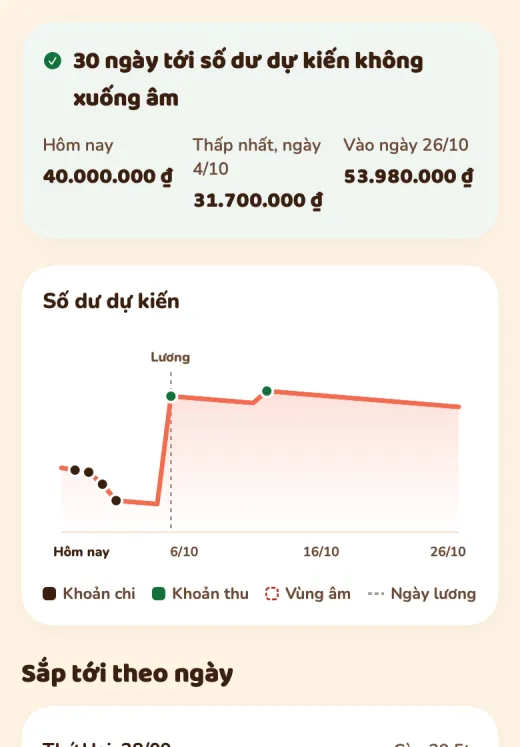
  • 30-day cash flow screen: projected balance chart, payday marker and upcoming items

    30-day cash flow Pro

    Your projected balance by day and a “safe to spend today” figure.
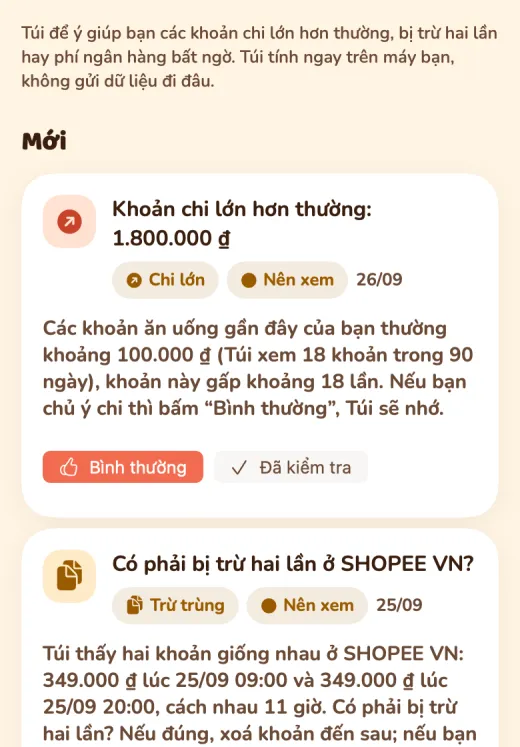
  • Túi noticed something screen: a larger-than-usual expense and a suspected double charge

    Túi noticed something Pro

    An unusually large expense, a surprise fee, a charge taken twice. Worked out on your phone.
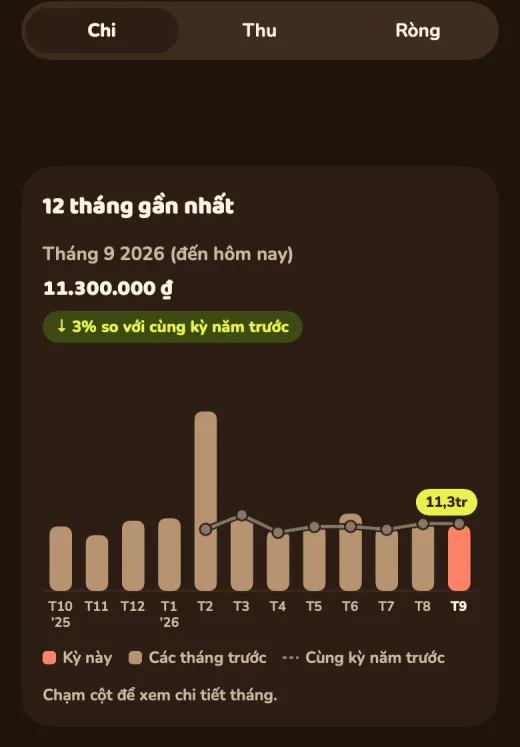
  • 12-month trend screen in dark mode: monthly spending bars and last-year comparison line

    12-month trend Pro

    Compared with the same period last year, by category. Free sees 3 months.

  • VietQR card requesting 150,000 dong with bank, transfer note and a reminder to check the recipient name

    Debt QR code Pro

    A VietQR code made on your phone, payable from any bank that accepts QR.

Wrapped in many styles: show off the heat, not the balance

Weekly, monthly, yearly, 9:16 cards for stories. Amounts are hidden by default; cards show only heat, percentages and Túi’s face.


  • Monthly Wrapped card: Túi winking with the title “Cool”
  • Monthly Wrapped card: your peak spending hour is 3 pm
  • Monthly Wrapped card: Túi comments on your bubble tea habit
  • Wallet Mirror card with the title “Bubble Tea Champion”

Features

Everything about your money, in one place

What the iOS app already does, with the plan you need. What is still in progress lives on the roadmap.

  • Category budgets

    Alerts at 80% and when you go over, undo after a mistaken delete.

    Free 3 categories

  • Multiple wallets, transfers

    Cash, bank and e-wallets. Moving money between two wallets is not counted as spending or income.

    Free

  • Credit card wallet

    Limit, balance owed, statement day, “swipe today, pay by this date” and reminders before the due date. Never stores the full card number.

    Pro

  • In-app tour and guides

    Túi walks you around on first launch, and the “Get to know Túi” card has 4 tasks that tick themselves; replay in Settings › Guide.

    Free

  • Events and trips

    Each trip gets its own budget, forecast and charts.

    Free 1 open

  • Subscriptions, recurring, instalments

    Subscriptions detected from history, yearly total, price-hike and duplicate-charge alerts.

    Pro

  • Debts and VietQR

    Track loans, get due-date reminders and ask for repayment with a VietQR code for any bank that accepts QR.

    Debts: Free · QR: Pro

  • Share a loan

    Send a link so the other person sees their part, no app install needed to see the code.

    Pro

  • Report export

    CSV on every plan. PDF and Excel by week, month, quarter or year, built on your phone.

    PDF, Excel: Pro

  • Assets in the app

    Savings, gold and silver, currencies and goals with market prices inside the app. Pro adds profit/loss, maturity reminders and price alerts.

    Free has limits

  • Fire Keepers

    A best-friends widget that shows only fire level and expression. Share the heat, not the balance.

    Max

  • Ask Túi

    Ask “how much did I spend eating out last month?”. AI only receives summary numbers, never individual transactions.

    Free 3 · Pro 12 · Max 30 a day

  • Widgets, Share Extension

    See the heat on your home screen, send a bill photo to Túi from another app.

    Free

  • Next-month plan

    Túi drafts next month’s budget from your recent spending; you adjust and apply. In testing.

    Max · in testing

  • Wrapped, roast report

    Weekly Wrapped is free; monthly, yearly and the three-voice roast report are Pro.

    Weekly: Free

Privacy

Your money, your data

Cháy Túi is local-first: if it can be done on the phone, nothing is sent anywhere.

  • Data stays on your iPhone

    Transactions are stored on the device. Multi-device sync only runs when you sign in (all plans).

  • Photos leave only when you tap

    The phone reads the bill first. A photo is sent only if you choose cloud AI, after you agree.

  • No bank password

    No account linking. Transactions come from bills you snap, sentences you type or statement files you import.

  • Sharing without numbers

    Wrapped cards and Fire Keepers show only heat. Amounts are hidden by default.

  • Export and delete any time

    Export CSV/JSON, delete your account and data right in the app.

  • Face ID lock

    Lock the app with Face ID or your passcode; sign-in tokens live in the Keychain.

Pricing

Free stays free, Pro when you want automation

Buy and cancel in the app through Apple. The website does not sell plans.

FREE

Free

Everything you need to track daily.

  • Unlimited logging
  • Cloud AI: 30 scans/month
  • Budgets for 3 categories
  • Túi Fire, Burn Day countdown
  • Ask Túi 3 questions/day
PROPopular

490,000 ₫ per year

About 41,000 ₫/month · Save 2 months

Let Túi do more of the work.

  • Everything in Free
  • Cloud AI: 300 scans/month
  • Ask Túi 12 questions/day
  • PDF and Excel export; 12-month trend
  • Unlimited events and budgets
MAX

990,000 ₫ per year

About 83,000 ₫/month · Save 2 months

The most capable AI assistant, for heavy users.

  • Everything in Pro
  • Cloud AI: 600 scans/month, stronger model
  • Ask Túi 30 questions/day
  • Fire Keepers, family wallet
  • AI asset insights, MCP token

Each plan has a fair monthly AI allowance to keep prices stable. When you reach it, receipts are still read on your device.

Frequently asked questions

Is Cháy Túi free?
Yes. The Free plan stays free: unlimited logging, on-device AI receipt reading, charts, Túi Fire, the Burn Day and 30 cloud AI scans a month. See pricing.
How is cloud AI different from on-device scanning?
By default Túi reads receipts on your phone, fast and unlimited. For tricky ones (blurry, long, unusual text) Túi can send the image to an AI server for a more accurate read; each use counts as one cloud AI scan. When they run out, Túi still reads on your device.
Why is AI limited each month?
Every cloud AI use costs real money. Limits keep plan prices steady for everyone instead of rising because of a few heavy accounts. On-device scanning, manual entry and reports do not count. Monthly limits reset at 00:00 on the 1st and daily limits at 00:00 each day, both in Vietnam time.
What is the difference between Pro and Max?
Pro unlocks advanced features (credit-card wallets, deeper reports, automation) and 300 cloud AI scans a month. Max has everything in Pro plus 600 cloud AI scans, 30 Túi messages a day, next-month budget planning and asset comments. See pricing.
Where is my spending data stored?
On your iPhone. Cháy Túi is local-first; cloud sync only runs when you sign in to use multiple devices (all plans). Details in the privacy policy.
Does the AI see all my photos?
No. The app only reads the photo you pick to scan. The phone reads first; a photo goes to cloud AI only when you choose it, after you agree. Private mode sends text with account and phone numbers masked.
Do I need to log in to my bank?
No. Cháy Túi never links bank accounts or asks for passwords. You log by snapping bills, chatting, typing, or importing a statement file downloaded from your bank.
Which banks work with the debt QR code?
The VietQR code is generated on your phone and can be scanned by the apps of banks that accept QR transfers. Cháy Túi only generates the code, holds no money and does not verify accounts, so check the recipient name before paying. Creating QR codes is a Pro benefit.
Where do I buy Pro or Max? How do I cancel?
Only in the app via Apple In-App Purchase. Cancel in iPhone Settings → Apple ID → Subscriptions. The website does not sell plans or take payments.
How do I sign in? What if I forget my password?
Sign in with a 6-digit code sent by email, or set a password (at least 8 characters with letters and digits) to skip the code. Forgot it? Enter your email to get a reset code. You can also use the app without signing in; your data then stays on this phone only.
Does sharing Wrapped reveal my amounts?
Not by default. Share cards show only heat, percentages and Túi’s face; you must turn on “Show numbers” yourself.
Are there Android and web versions?
The Android app is in development with no release date yet. A web app is on the roadmap. Leave your email at the bottom of the page and Túi will let you know when Android is ready.
What does Cháy Túi already do, and what is missing?
The roadmap lists what already works on iPhone, what we are finishing (in-app purchase, push notifications) and what is coming.
Túi · Ăn mừng

Get Cháy Túi on the App Store

Download it and try it on your iPhone now. The Free plan stays free.

Download on the App Store

On Android? The Android app is in development